Smart Device Print2.1.0
Publisher Description
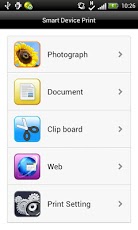
This application can be used to print photos or documents on Android devices using Ricoh printers or MFPs.Main features:・Print the photos in photo applications on Android devices.・Print the PDF documents on Android devices.・Print the texts saved on the clipboard.・Print the web pages displayed in this application. ・Print the JPG or PDF files in other applications.・Print securely using user code or user authentication.・Print using on-demand print application.*1・Print using LF (location free) print server.*2*1: On-demand print application to print with: Enhanced Locked Print NX*2: LF printer server to print with: Enhanced Locked Print NX FlexRelease Server V2Supported languages:・English, Japanese, German, French, Italian, Spanish and Portugueseã€ÂSupported Models (Models on which this application has been tested OK)】The supported models added in Ver2.1.0 are as follows: ・Aficio SG 7100DNPlease check the following website for the latest supported models:https://www.neusoft.co.jp/contactwidget/support/en/smartdeviceprint.htm
About Smart Device Print
The company that develops Smart Device Print is NEUSOFT Japan Co, Ltd.. The latest version released by its developer is 2.1.0. This app was rated by 1 users of our site and has an average rating of 3.0.
To install Smart Device Print on your Android device, just click the green Continue To App button above to start the installation process. The app is listed on our website since 2013-05-14 and was downloaded 79 times. We have already checked if the download link is safe, however for your own protection we recommend that you scan the downloaded app with your antivirus. Your antivirus may detect the Smart Device Print as malware as malware if the download link to com.neusoft.quickprint is broken.
How to install Smart Device Print on your Android device:
- Click on the Continue To App button on our website. This will redirect you to Google Play.
- Once the Smart Device Print is shown in the Google Play listing of your Android device, you can start its download and installation. Tap on the Install button located below the search bar and to the right of the app icon.
- A pop-up window with the permissions required by Smart Device Print will be shown. Click on Accept to continue the process.
- Smart Device Print will be downloaded onto your device, displaying a progress. Once the download completes, the installation will start and you'll get a notification after the installation is finished.
Program Details
System requirements
Download information
Pricing
Version History
version 2.1.0
posted on 2013-05-14
Several fixes and updates
